Release of 30 September 2026
This release lets only one person edit an inquiry at a time, shows who has it open, and adds Take over. Microsoft 365 channels get a name for the Submitted label.
Highlights
See who has an inquiry open, and take it over
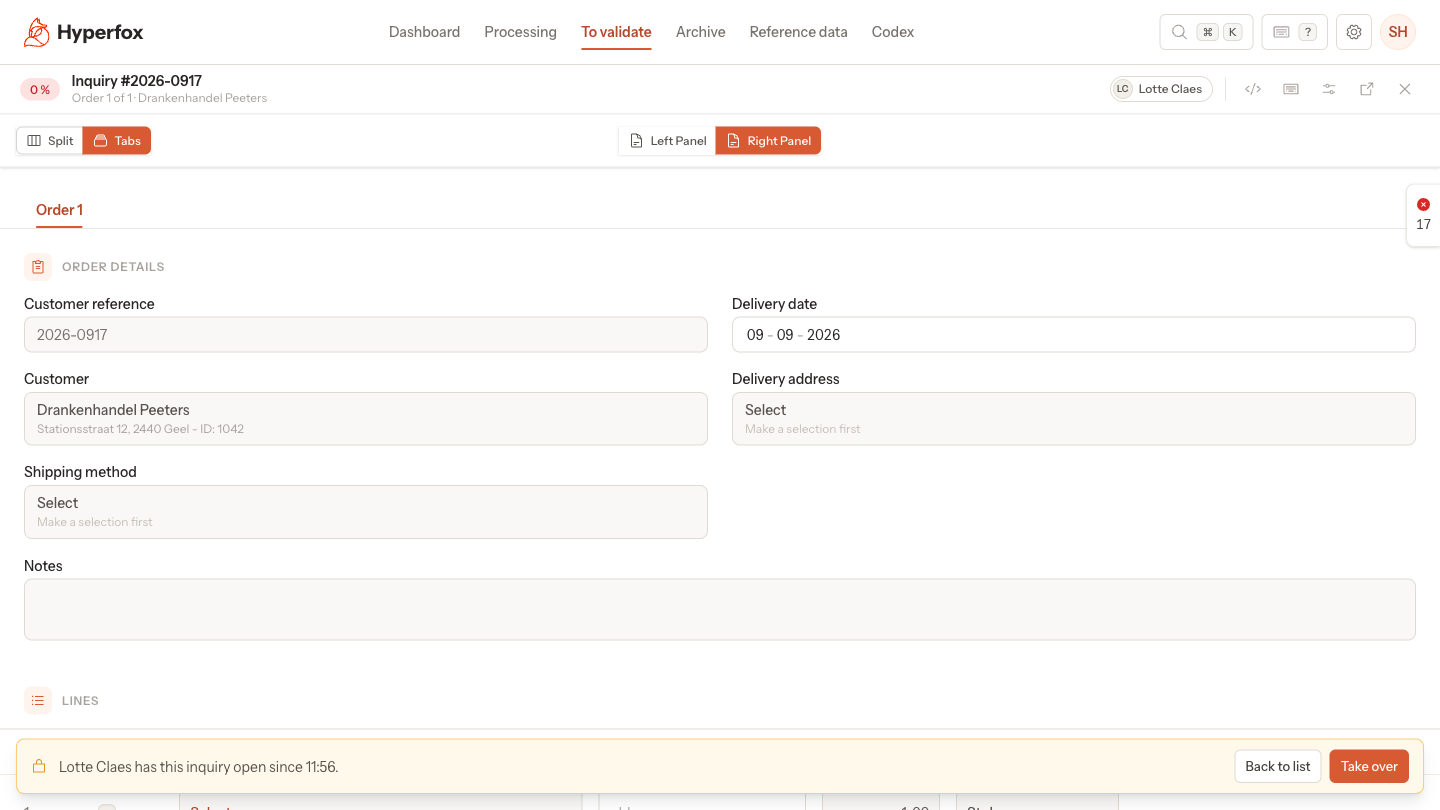
Whoever opens an inquiry first holds the lock on it: a colleague who opens it too sees it read-only, with a bar that names you, and To validate shows your initials under Open by a colleague. Why: two people correcting the same inquiry no longer overwrite each other's work without noticing. How it works: the lock ends when you leave the inquiry, and Take over gives it to a colleague at once and discards your unsaved changes; see What happens when you and a colleague open the same order › Take over.
New
- On a Microsoft 365 channel, Label names has a name for Submitted, the Outlook category Hyperfox puts on a mail whose order was sent to your integration. Like the other names, it is required, must differ from the others and applies only to mail processed afterwards; see Channels › Microsoft 365.
Changed
- When two people validate the same inquiry at the same moment, Hyperfox sends it once. The notice on an inquiry that a colleague already validated or rejected names that colleague, without a time; see Save or Validate is blocked, or the order is read-only › "This inquiry was already validated" or "This inquiry was rejected".
- A refused save shows "Save failed" with "Fill in the required fields. The errors are shown at the fields." in your language; see Save or Validate is blocked, or the order is read-only › "Save failed": "Fill in the required fields. The errors are shown at the fields.".
- The AI skips hidden rows, columns and sheets when it reads an Excel file; see How the AI reads an order › Read the document.
- The Qargo connector files the original e-mail and its PDF attachments as documents on the Qargo order, and no longer the data file of Hyperfox or signature images. A failed Qargo export now always leaves a failed run under the export profile; see What Hyperfox sends to your ERP › The template decides the format.
- Codex, the admin logs, the webhook log and the import and export run lists also remember the number of rows per page you chose; see Order lists and the dashboard › Filters, sorting and page size.
Fixed
- Orders that came in through an API channel show "—" for accuracy in To validate and Archive instead of a red 0 %, and a split inquiry shows the lowest accuracy of its orders; see Order and inquiry statuses › Accuracy.
- When the unit picker of a line allows only the units of the item, it lists all of them, also the ones further down the list; see Fix order lines: item, quantity and unit › Change the quantity and the unit.
- In a document that holds a collective page with every item and a page per order, pointing to a line jumps to the page of that order; see The validation screen › Source pane.
- Two attachments with the same file name in one e-mail are both kept, instead of the second replacing the first; see Which e-mails and attachments Hyperfox picks up › Which attachments the AI reads.