Release of 7 October 2026
This release lets you add, change, copy and delete reference data records in Hyperfox, and gives every new Forward E-mail channel an address of its own.
Highlights
Manage reference data in Hyperfox
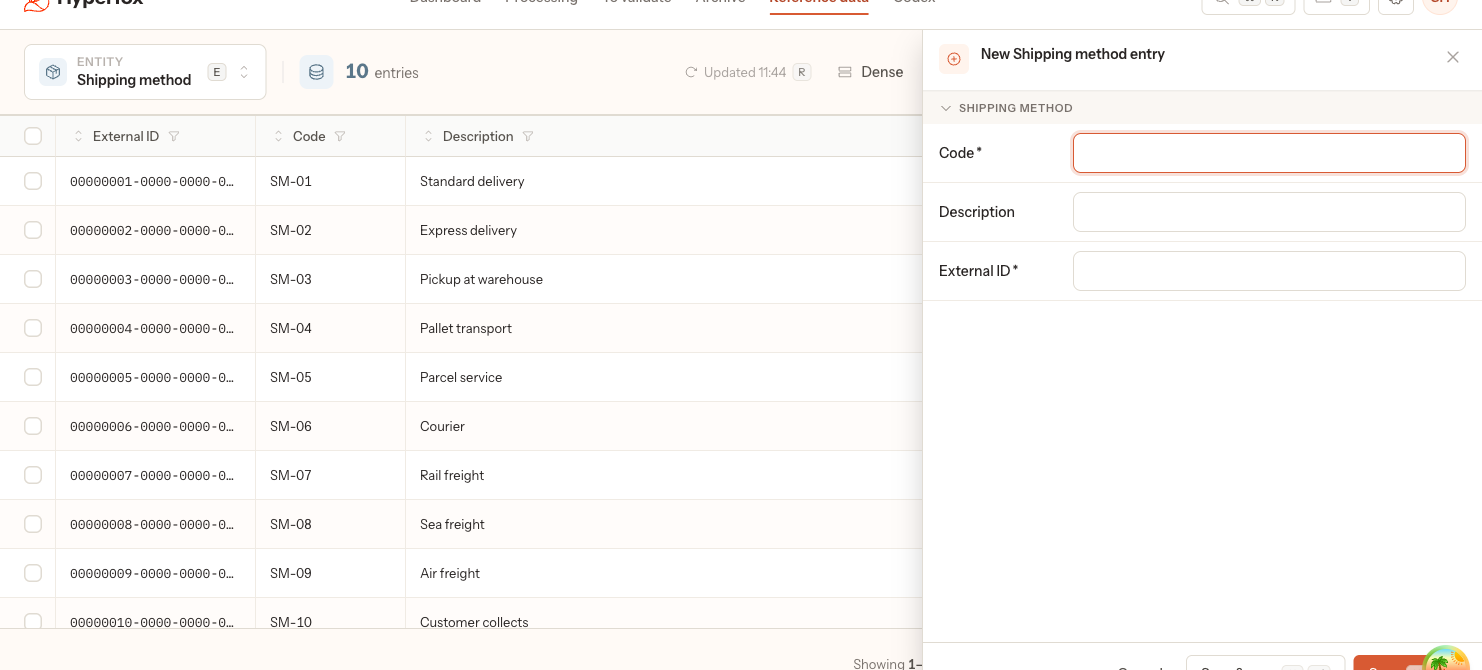
On Reference data, you add, change, copy and delete the records of a list that no import fills, in a side panel or right in a cell of the table. Why: correcting or adding a few records no longer needs a new import file or help from Hyperfox. How it works: a list filled by an import shows Read-only, because the next import run removes records added by hand; see Add, edit and delete reference data records › Add a record.
New
- Every Forward E-mail channel your admin adds gets an address of its own, under Accounts, ending in
@to-hyperfox.com; see Forward order mail to Hyperfox › Add a second channel for another kind of order.
Fixed
- A warning in the AI mapping that checks how many records a customer has in a list, for example delivery addresses, also recognises a customer who has none; see Mappings.
Documentation updated in this release
- Add, edit and delete reference data records
- Forward order mail to Hyperfox